Custom Twitch Extensions: Interactive Broadcast Apps & Bits Cheering
We engineer interactive applications, custom extensions, and community immersion engines that connect audiences across platforms. Explore the Rock Paper Scissors Championship League—a production-grade Twitch extension featuring a custom Config Dashboard, interactive Viewer Panel, and optional live OBS Overlay. Viewers support broadcasters through Bits Cheering, triggering live card battles, earning 1:1 digital Prestige Points for every Bit cheered, and climbing seasonal cross-Twitch leaderboards.
Rock Paper Scissors
Championship League
Extension Configuration & Seasonal Leaderboards
Streamers never have to pause gameplay or manually click buttons during matches—the Rock Paper Scissors Championship League runs asynchronously in the cloud 24/7, even when you're off-line! What makes this league truly electric is its platform-wide community engagement: your viewers aren't just cheering locally on your channel, they're competing on a global stage. The consolidated Season 1 leaderboards track and rank every single viewer and broadcaster across all of Twitch, creating an immersive, platform-wide rivalry. As soon as you install the extension, the step-by-step 'Getting Started' configuration page guides you through activating the extension on Twitch Panel 1, choosing your minimum base Cheer Tier floor, and grabbing your 1-click OBS overlay Browser Source URL.
Broadcaster Setup & OBS Generator
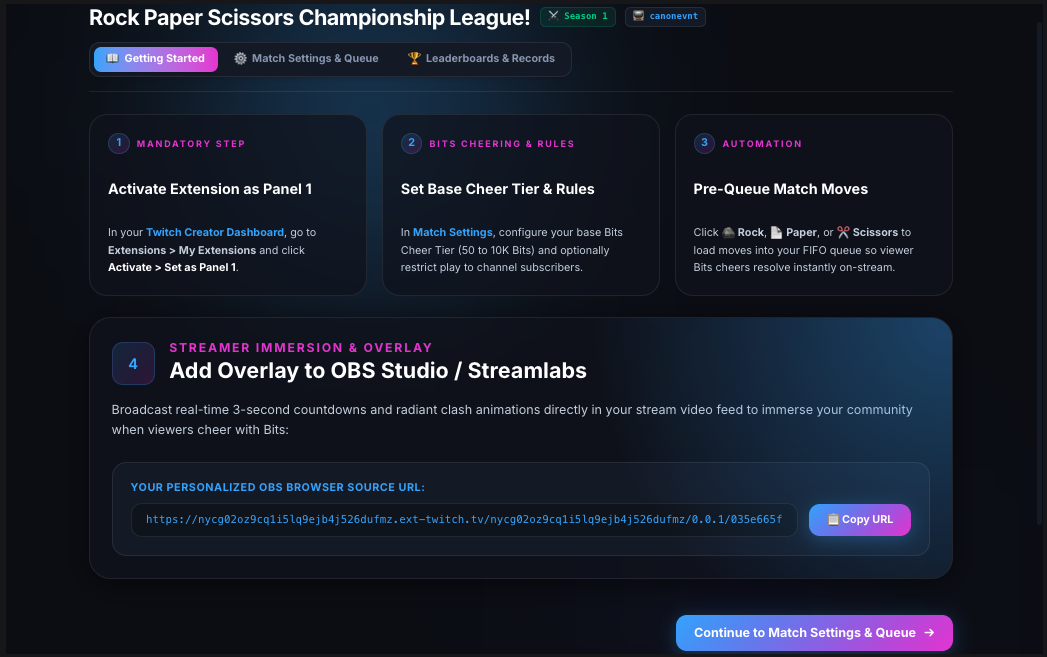
The step-by-step Getting Started dashboard gets your channel live in under 2 minutes:
- 1. Activate on Panel 1: Direct instructions on assigning the extension to Twitch Panel 1 (the mandatory Bits slot).
- 2. Configure Base Floor: Choose your minimum base Cheer Tier floor (50 to 10,000 Bits) and subscriber gating.
- 3. Pre-Stage Move Queue: Queue up to 10 moves so matches run autonomously 24/7.
- 4. 1-Click OBS Overlay URL: Copy your personalized, cryptographically hashed 1080p Browser Source URL straight into OBS Studio or Streamlabs.
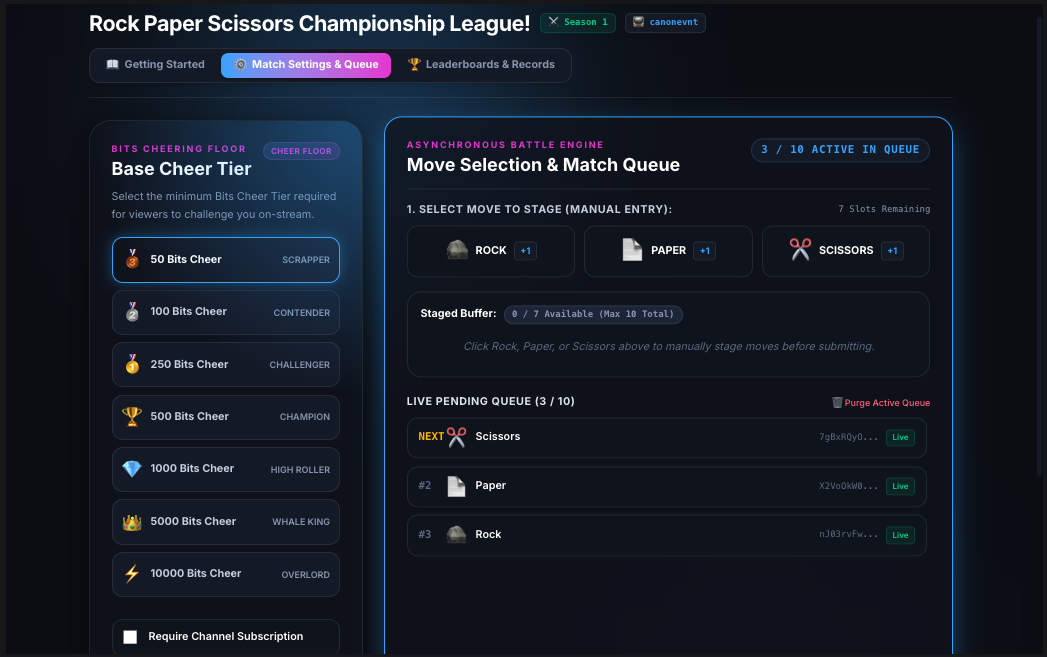
Pre-Queued Move Queue (FIFO • Max 10)
Streamers manually pre-stage moves (🪨 Rock, 📄 Paper, ✂️ Scissors) into an authentic FIFO queue (max 10). As viewers challenge the stream, the EBS atomically pops your oldest queued move, letting you broadcast uninterrupted.
Base Floor & Subscriber Gating
Broadcasters configure their minimum base Cheer Tier floor (50 to 10K Bits) and toggle subscriber-only gating to tailor the challenge experience to their channel's community goals.
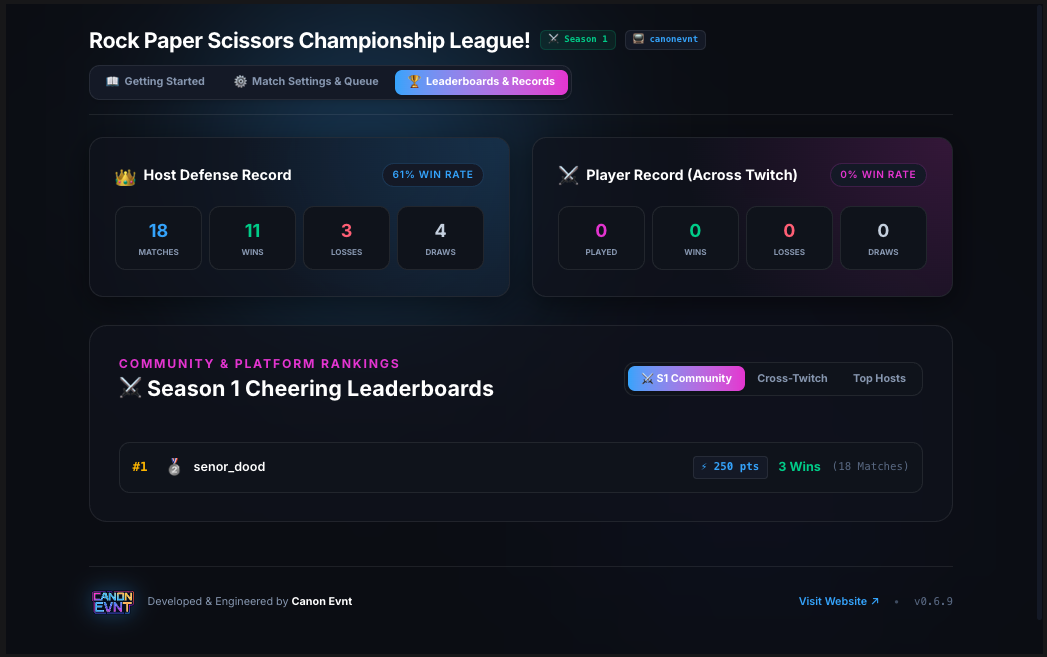
Season 1 Tri-Tier Leaderboards
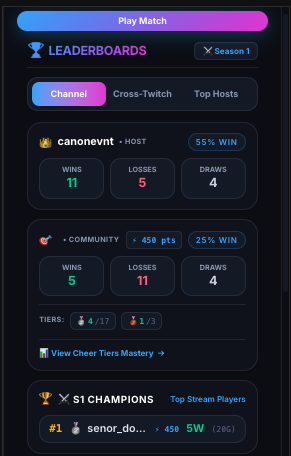
Live cross-Twitch competitive network: tracks ⚔️ Season 1 Champions (top 10 channel viewers by Prestige Score), ⚔️ Season 1 Hall of Fame (top 20 players across Twitch), and Top Broadcasters.
Dual-Identity Analytics & Records
Inspect your Host Defense Record (streamer wins vs. viewer wins vs. draws) alongside personal player records, win rates, and 5-minute automated Cloud Scheduler rankings aggregation.
Interactive Viewer Panel & Bits Cheering
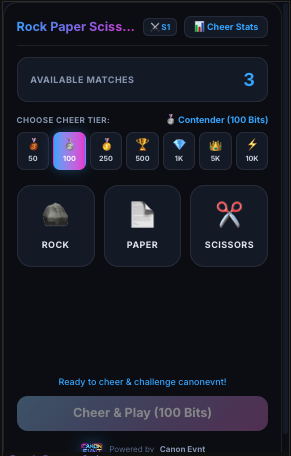
Activating the extension into Twitch Panel 1 is the foundational viewer entry point that brings the entire interaction loop to life. Situated directly beneath your stream feed, the panel serves as the interactive battleground where viewers browse active challenges, pick their move (🪨 Rock, 📄 Paper, ✂️ Scissors), and jump into the match by selecting their desired Cheering Tier (from 🥉 50 Bits up to ⚡ 10,000 Bits) to support the stream.
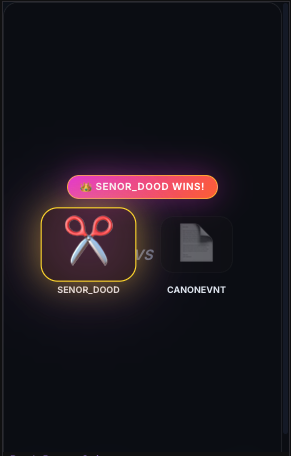
Matches resolve instantly through atomic cloud transactions against your pre-queued moves—whether you're broadcasting live or completely off-line! Every Bits cheer challenge is cryptographically verified via Twitch JWT HS256 validation for rock-solid security, anti-self-play protection, and zero duplicate charges. Every completed cheer challenge awards 1:1 digital Prestige Points directly into seasonal standings, while the panel allows viewers to inspect their 7-tier mastery stats and toggle between Season 1 ([⚔️ S1]) and permanent lifetime records ([🌟 Life]).
Optional Broadcast Overlay & On-Stream Immersion
Adding the OBS stream overlay is entirely optional and never required for the full experience. Because the complete match animation and interactive game loop run natively inside Twitch Panel 1, viewers get the full battle showdown right in their browser. However, when streamers want to turn Bits cheers into live broadcast hype, the overlay bridges that action directly onto your video canvas via sub-10ms Server-Sent Events (SSE). Note: The overlay operates as an independent OBS Browser Source so it never conflicts with Twitch's single-slot extension limits.
Optional OBS & Streamlabs Canvas
A transparent 1920x1080 HTML5 Browser Source. Streamers can enable this for on-stream hype or leave it off—the full match animation still runs natively inside Twitch Panel 1.
Sub-10ms Server-Sent Events (SSE)
Direct Server-Sent Events (SSE) persistent stream bridge connecting Cloud Functions EBS to OBS, delivering instant match alerts without polling delays.
Synchronized Dual-View Reveal
Plays a synchronized 3-second countdown (1,000ms ticks), card clash, loser card dimming, and golden victory banner across both the OBS broadcast video and the challenger's viewer panel.
Autonomous 24/7 Bits Cheering & Community Engagement
Your broadcast schedule shouldn't limit your community engagement or Bits revenue. By pre-queuing moves in your configuration dashboard, your Twitch extension operates autonomously around the clock—allowing viewers to cheer with Bits, spark live on-stream matches, earn digital Prestige Points, and climb seasonal leaderboards whether you're broadcasting live or completely off-line.
We manage and host the entire high-performance Firebase EBS cloud backend for you. You get enterprise-grade uptime and instant auto-scaling that effortlessly handles massive raid surges, all with zero server maintenance overhead on your end.
Built-In Broadcaster Advantages
-
🔑
Zero Technical Maintenance We host and manage the cloud infrastructure, database scaling, and uptime for you. No server configurations required.
-
🛡️
Cryptographic Security & Fair Play HS256 JWT signature validation, anti-self-play protection, EventSub HMAC verification, and verified Bits transaction settlements with zero duplicate charges.
-
⚡
Instant Raid & Traffic Resilience High-throughput cloud architecture scales instantly during viewer spikes, delivering sub-second match resolutions with zero stream lag.
-
📜
Twitch Certification Compliance Fully policy-aligned with dedicated Extension Terms and Privacy Policy.
How We Build Your Custom Creator App
From your interactive stream ideas to custom code, Twitch extension certification, and live deployment.
Concept & Cheer Tier Mapping
We outline your interactive game mechanics, 7 Cheer Tiers, digital Prestige rewards, overlay visuals, and audience engagement paths together.
Custom Full-Stack Engineering
Building responsive React 19 / TypeScript frontend views, serverless Cloud Functions EBS, Cloud Firestore single-read/write schemas, and real-time SSE stream overlays.
Twitch Rig Testing & Certification
We test in Twitch Developer Rig, configure your OBS scenes, deploy to your GCP organization, and guide you through official Twitch extension review.